
Nanit Sound and Light
NanitParenting
3.456.00 Reviews
- Version
- 1.11.0
- Installs
- 10.00K
- Age Rating
- Everyone
Screenshots
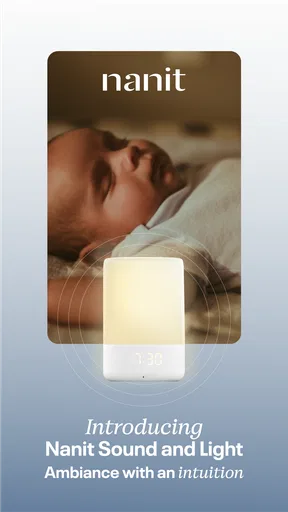
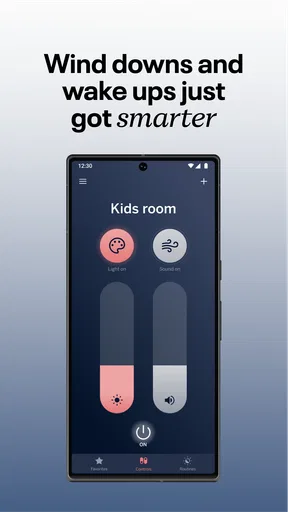
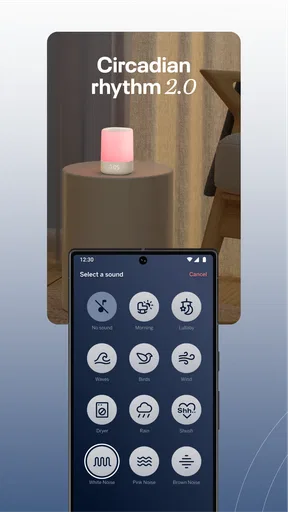
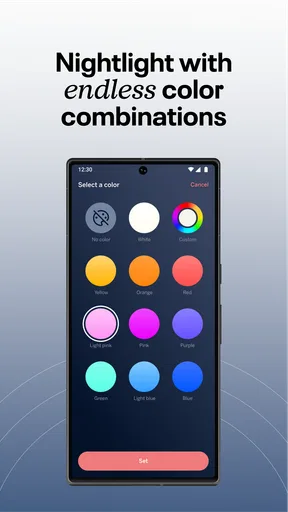
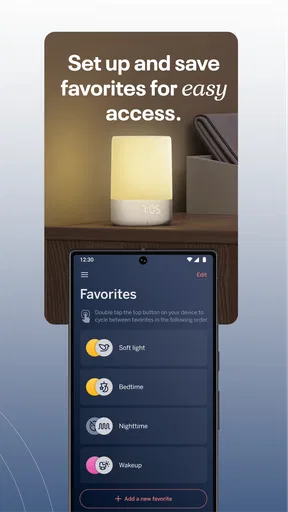
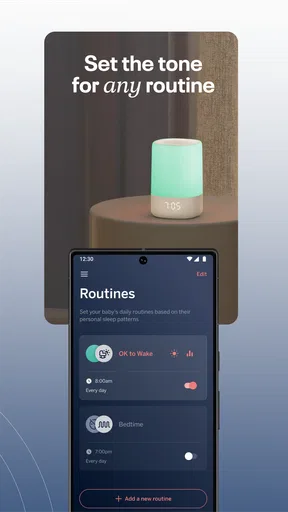
Our Review of Nanit Sound and Light
 Analysis by Appyee
When bedtime gets noisy or the room feels too dark, a simple sound machine and night light can be more useful than another complicated parenting dashboard. I spent time with Nanit Sound and Light to see whether it earns a place in that routine. Developed by Nanit, this free parenting app focuses on two jobs: providing steady background sound and adding a gentle light for a child’s room.
That narrow purpose is both its appeal and its limitation. I found it easier to understand than a full baby-monitoring platform, but I also had to accept that it is not trying to replace one. If you want a focused companion for settling down, it makes sense. If you expect detailed sleep analysis, camera controls, or a large library of smart nursery tools, you may find the experience too modest.
What Nanit Sound and Light feels like today
The app is listed as a free download for everyone, which makes it easy to try without turning bedtime into a purchase decision. Its average rating is 3.4 from around 144 ratings, so I would not approach it as a universally loved solution. That middle-of-the-road response matches my impression: the concept is practical, but the value depends heavily on how well it fits your existing bedtime habits and phone setup.
The most important thing to understand is that this is an app for atmosphere, not supervision. A sound machine can cover distracting household noise, while a night light can make a late-night check less disruptive. Those are small improvements, but they matter when a child wakes easily or when a parent needs to move around the room without switching on a bright lamp.
I especially liked the idea of keeping these two functions together. In a typical home, parents often use a separate speaker, a spare phone, and a plug-in lamp. Combining the sound and light controls reduces the number of objects beside the crib. It does not transform bedtime, but it can make the routine less cluttered.
A realistic bedtime routine
Picture a child who is nearly asleep while someone is washing dishes in the kitchen. Rather than turning the television louder or repeatedly checking the room, I would start a consistent background sound and keep the light at a low, calming level. Later, if the child wakes, the same setup can help a parent enter the room without creating a sudden change from darkness to harsh ceiling light.
The useful detail here is consistency. I would choose the sound and light setting before beginning the bedtime routine, then avoid changing them every few minutes. Children can respond better to familiar cues, and parents benefit from not having to make a fresh decision when they are already tired. The app is most convincing when used as a repeatable part of the evening rather than as an emergency fix.
It is also worth treating the phone as part of the routine. I would set the device where it can be reached safely, keep notifications from interrupting the session, and avoid using the phone screen as the actual night light. The dedicated light function is meant to be calmer than a bright display, while the phone itself should remain a control tool rather than another source of stimulation.
How the current version fits into the product’s evolution
The current release is version 1.11.0, and the app first appeared on March 22, 2023. Those details place it in a relatively focused stage of development rather than presenting it as a mature, all-purpose nursery platform. I see the product as an extension of Nanit’s interest in the sleep environment, but the experience remains deliberately centered on sound and light.
That focus is helpful because the interface does not need to compete with a long list of unrelated controls. At the same time, a focused app has less room to hide rough edges. When the main task is simply starting a sound or adjusting a light, users notice every delay, unclear control, or interruption more quickly than they would in a feature-heavy app.
The minimum requirement is Android 10, which is important before installing it on an older household phone or a device kept in the nursery. I would check the operating system of the device you actually plan to use, not just your newest personal phone. A spare phone often becomes the dedicated bedtime controller, and compatibility matters more there than on the device you carry every day.
What has changed for people already using it
For existing users, the move to version 1.11.0 is best viewed as part of ongoing maintenance and refinement rather than a reason to rebuild the entire bedtime routine. I would update normally, then test the app during the day before relying on it overnight. That quick check lets you confirm that the controls behave as expected and that the chosen device remains suitable for the room.
I would also avoid updating immediately before an important sleep transition, such as the first night in a new room. Even a small interface adjustment can be annoying when you are trying to work in the dark. Preparing the sound and light settings ahead of time gives you a fallback if you need to repeat the routine without exploring menus at bedtime.
The app’s free price makes experimentation easier for current users and newcomers alike. You can decide whether the combination actually helps your family without committing money first. Still, “free” does not remove the practical cost of another device, charging habits, and the attention needed to keep the setup reliable. A parent who already owns a dependable sound machine may not gain enough to justify changing systems.
Where it works better than ordinary alternatives
Compared with playing a long audio track from a music app, a dedicated nursery-oriented tool feels more appropriate because the purpose is clear. Music apps are built for discovery and entertainment, while this app is meant to support a quiet environment. That difference can make the bedtime controller easier to hand to another caregiver who does not want to search through playlists or manage unrelated recommendations.
Compared with a basic plug-in night light, the app offers more flexibility because the light is controlled from the same place as the sound. The trade-off is that a phone or compatible setup becomes part of the chain. A plug-in lamp continues working as a standalone object, while an app-based arrangement depends on the device being available and ready.
Compared with a full baby-monitoring system, Nanit Sound and Light is much less demanding to learn. That is a strength for families who already have a separate camera or who do not want video in the nursery. However, it should not be chosen by someone expecting visual monitoring or a complete record of sleep behavior. Its value comes from simplicity, not from replacing every nursery accessory.
One practical tip is to decide which device owns the job. If the app runs on your main phone, calls, alerts, and low battery can become distractions. If it runs on a spare device, you gain separation but must remember to charge it and keep it nearby. In my view, a dedicated device is the cleaner arrangement, provided you are comfortable maintaining it.
Small decisions that make a noticeable difference
First, I would test the sound from the child’s usual sleeping position rather than from the doorway. A setting that seems quiet beside you may be more noticeable near the crib, and a setting that sounds comfortable in your hand may be too prominent in the room. The goal is a steady background, not a new focal point.
Second, I would use the light mainly for movement, not illumination. A dim glow can help with feeding, changing, or checking bedding, but it may not be enough for a detailed task. Keeping a separate, safe source of brighter light available is sensible, while avoiding the temptation to make the app’s light do every job.
Third, I would create a handoff routine for other caregivers. Show them which control starts the sound, which adjusts the light, and where the phone is kept. This prevents the common situation where one parent knows the setup but a grandparent or babysitter has to improvise in the middle of the night.
A fourth insight is to use the app as a cue rather than a promise. Background sound may reduce the impact of ordinary household noise, but it cannot guarantee uninterrupted sleep. If the room is too warm, the bedtime schedule is inconsistent, or the child is uncomfortable, changing the sound will not solve the underlying issue. This app works best as one small part of a broader routine.
Remaining gaps and everyday friction
The narrow feature set may leave experienced parents wanting more control. Someone who prefers detailed schedules, richer audio choices, automation, or deeper integration with other nursery equipment should compare it carefully with a dedicated smart speaker or a more complete baby-care platform. I would not select this app solely because it comes from a familiar developer; the actual sound-and-light workflow has to suit you.
There is also a difference between a digital control and a physical appliance. A traditional sound machine usually has buttons you can find by touch, while an app requires a screen and a few taps. That can be inconvenient when you are holding a sleeping child. The benefit is convenience when the phone is already in your hand; the weakness appears when you need immediate, screen-free control.
Families with strict device-free bedrooms may also prefer a standalone alternative. The app keeps the phone involved, and some parents will see that as unnecessary stimulation or another object to manage. In that situation, a simple sound machine paired with a low-intensity night light may be the better choice, even if it offers fewer settings.
I would skip this app if your main requirement is monitoring rather than ambience. It is not the right answer for someone choosing a first camera, looking for detailed sleep reports, or wanting one application to manage every nursery function. I would also skip it if your current speaker and lamp already work reliably and you dislike replacing simple equipment with a phone-based routine.
Questions worth answering before you rely on it
Is it suitable for a baby’s room? The age classification is Everyone, and the purpose is clearly family-oriented, but suitability still depends on how you position and use the device. I would keep the phone and any connected equipment safely away from the crib, avoid placing objects where a child can reach them, and treat the app as an environmental aid rather than a safety device.
Can it replace a baby monitor? I would not count on it for that. The app’s identity is built around sound and light, so a parent who needs visual awareness should use a separate monitoring solution. This distinction is easy to miss if you are already familiar with Nanit as a parenting brand, but it is central to choosing the right product.
Is the free download enough to make it worthwhile? For trying the concept, yes. The absence of an upfront price lowers the barrier, especially for a family unsure whether a phone-controlled sound and light routine will help. For long-term use, I would compare the convenience against the cost of charging a device, keeping it available, and accepting the limitations of app controls.
Will it help every child sleep? No app can promise that. I would judge it over several ordinary evenings, looking for practical signs: fewer interruptions from household noise, less need for a bright lamp, and a smoother handoff between caregivers. If none of those improve, a physical sound machine or a different bedtime approach may be more useful.
Should you install it on an older phone? Only after checking that the device runs Android 10 or later and behaves reliably when left in its intended location. An old phone with a weak battery or distracting notifications can make the setup less dependable than a basic standalone product. The best device is not necessarily the newest one; it is the one you can keep ready without disrupting the routine.
What I would watch as the app develops
Because the current version is 1.11.0, I would pay attention to whether future updates make the two core actions faster and clearer rather than simply adding more menus. For this kind of app, useful progress would mean dependable controls, an easy handoff to caregivers, and a smooth experience when the phone is used in a dark room.
I would also watch how well the app continues to serve two different audiences: families who already use Nanit products and families who only want a sound machine and night light. The first group may appreciate a connected experience, while the second needs the app to stand on its own without feeling like an unnecessary gateway into a larger ecosystem.
My final view is cautiously positive. Nanit Sound and Light is most appealing when you want a focused bedtime helper, not a complete parenting command center. Its free availability, clear purpose, and combination of background sound with a gentle light make it worth trying for families who are comfortable using a phone in the nursery. The rating of 3.4 from around 144 ratings suggests that expectations should remain realistic, and my own recommendation comes with the same qualification.
If your household needs a simple way to soften noise and avoid bright lights during nighttime care, I can see this becoming a useful part of the routine. If you want tactile controls, independent hardware, or monitoring features, choose a conventional sound machine, standalone night light, or dedicated monitor instead. For the right family, Nanit Sound and Light is a convenient small tool; for everyone else, its focused design may feel more like a boundary than a benefit.
Verdict
Strengths of Nanit Sound and Light
- Two-way audio helps parents soothe babies remotely.
- Customizable night-light colors create a calming sleep environment.
- Works with Nanit cameras for a more complete nursery setup.
- Sleep sounds can support consistent bedtime routines.
- Remote controls are convenient during nighttime wake-ups.
Limitations of Nanit Sound and Light
- Requires compatible Nanit hardware to provide its full functionality.
- Some features may depend on a paid Nanit subscription.
- Audio playback can be affected by Wi-Fi interruptions.
- Limited value for families without other Nanit nursery products.
- Background operation may increase battery usage on mobile devices.
Other Releases by Nanit
View All
Nanit
Parenting3.8
Similar Picks in This Category
View All
Family Space
Motorola Mobility LLC.3.9

شرطة الأطفال - مكالمة وهمية
Oub Apps4.1

Findmykids: Parental Control
LETEM LTD4.6

Pregnancy + | Tracker App
Philips Electronics UK Limited4.8

Policía de niños - para padres
Kids police4.7

Pregnancy App
Amila4.9
Frequently Asked Questions
What is Nanit Sound and Light?
Nanit Sound and Light is a companion app for Nanit’s connected baby-monitoring ecosystem. It is designed to help parents manage compatible nursery features such as soothing sounds, gentle lighting, and selected sleep-related controls from a smartphone. The exact functions available can depend on the Nanit hardware you own, your account, app version, and regional availability, so checking device compatibility before downloading is recommended.
Do I need Nanit hardware to use Nanit Sound and Light?
In most cases, the app is intended to work with compatible Nanit devices rather than operate as a completely independent sound or night-light application. You may be able to install it and explore certain settings, but the main controls generally require supported Nanit hardware and a Nanit account. Before proceeding, confirm that your camera, sound machine, light, or nursery accessory is listed as compatible with the current version of the app.
Can Nanit Sound and Light play soothing sounds and control the nursery light remotely?
With compatible equipment, Nanit Sound and Light can provide convenient remote control over selected nursery functions, including soothing audio and lighting. This can be useful when you want to adjust the environment without entering the room and disturbing your child. Performance depends on the connected device, Wi-Fi quality, permissions, and whether the feature is supported in your location and subscription plan.
Is Nanit Sound and Light safe and reliable for monitoring a baby?
The app can make nursery routines more convenient, but it should not replace responsible supervision or safe-sleep practices. Network interruptions, phone settings, device updates, or power failures may affect notifications and remote controls. Parents should follow Nanit’s instructions, keep firmware and the app updated, use strong account security, and avoid relying on the application as the sole method of detecting an emergency.
Is Nanit Sound and Light free to download, and are there subscriptions or extra costs?
The download may be free, but using Nanit Sound and Light can require compatible Nanit hardware, and some advanced services may depend on a paid subscription or an included trial. Costs can vary according to the device bundle, plan, platform, and region. Review the current pricing, in-app purchase details, privacy terms, and required account conditions in the official Google Play or App Store listing before installing.
